Managed Memory
Objectives
Understand the difference between host memory, device memory, and managed memory
Allocate managed memory and understand its synchronisation requirements
Understand synchronisation between host and device
Instructor note
30 min teaching
30 min exercises
Memory spaces
A CUDA system has two main memory spaces that are physically separate:
Host (main) memory — CPU RAM, accessible by host code
Device (global) memory — GPU VRAM, accessible by device code
Without special annotations or allocation functions, memory resides in host memory and is not accessible from the device. To use data on the GPU, you must either:
Use managed memory — the CUDA runtime handles transfers automatically, or
Explicitly allocate device memory and copy data between host and device.
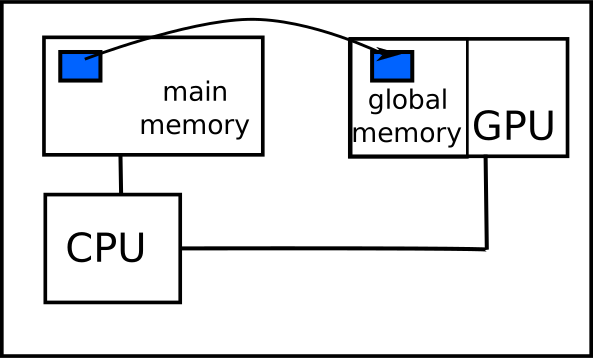
Managed memory (unified memory)
Managed memory is the simplest way to share data between host and device. The CUDA runtime automatically migrates data as needed.
Since CUDA 4, Unified Virtual Addressing (UVA) provides a single address space shared by CPU and all GPUs. Managed memory (available since CUDA 6) builds on UVA to provide automatic data migration.
__device__ __managed__ double X[1024];

__global__ void add_kernel(double* X, double* Y, int length) {
    int index = threadIdx.x + blockIdx.x * blockDim.x;
    if (index < length)
        X[index] += Y[index];
}

int main(void) {
    double *Y, *X;
    cudaMallocManaged((void**)&Y, 1024 * sizeof(double));
    cudaMallocManaged((void**)&X, 1024 * sizeof(double));
    add_kernel<<<4, 256>>>(X, Y, 1024);
    cudaDeviceSynchronize();  // Must synchronise before host access!
    cudaFree(Y);
    cudaFree(X);
}
module device_code
contains
  attributes(global) subroutine add_kernel(X, Y, length)
    real(8), managed :: X(length), Y(length)
    integer, value :: length
    integer :: idx
    idx = threadIdx%x + (blockIdx%x - 1) * blockDim%x
    if (idx <= length) X(idx) = X(idx) + Y(idx)
  end subroutine
end module

program main
  use device_code
  real(8), managed :: X(1024)
  real(8), allocatable, managed :: Y(:)
  integer :: error
  allocate(Y(1024))
  call add_kernel<<<4, 256>>>(X, Y, 1024)
  error = cudaDeviceSynchronize()  ! Must synchronise!
end program
Advantages:
Data is moved automatically — no need to manage transfers
“Oversubscription” is possible (data can exceed GPU memory)
Disadvantages:
The programmer must still synchronise before accessing data on the other side
Automatic transfers may not be optimal — the runtime cannot always predict access patterns
Important rules:
const-qualified variables and C++ references cannot be declared as managed memoryC++ classes/structs with
__managed__members have many restrictions; Fortran derived types withmanagedmembers work more freelyManaged memory can only be allocated and freed in host code
Managed memory API
Asynchronous execution and synchronisation
Since kernel launches are asynchronous, you must call cudaDeviceSynchronize() before accessing managed memory on the host after a kernel that modifies it. Without synchronisation, the host may read stale data — or worse, the access may cause a segfault.
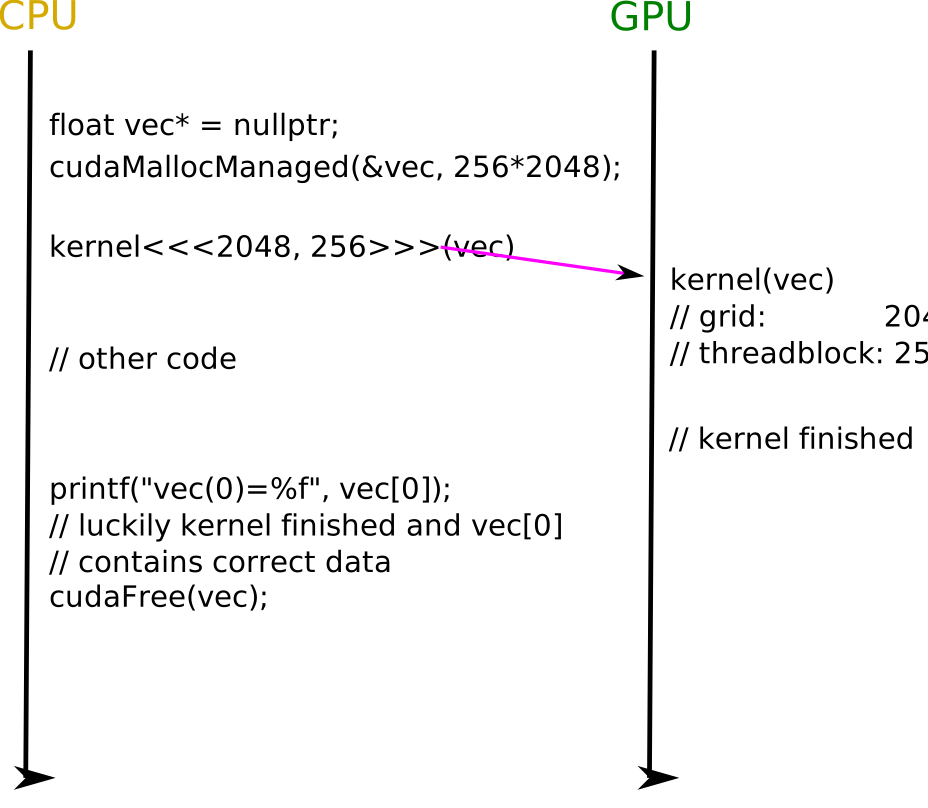
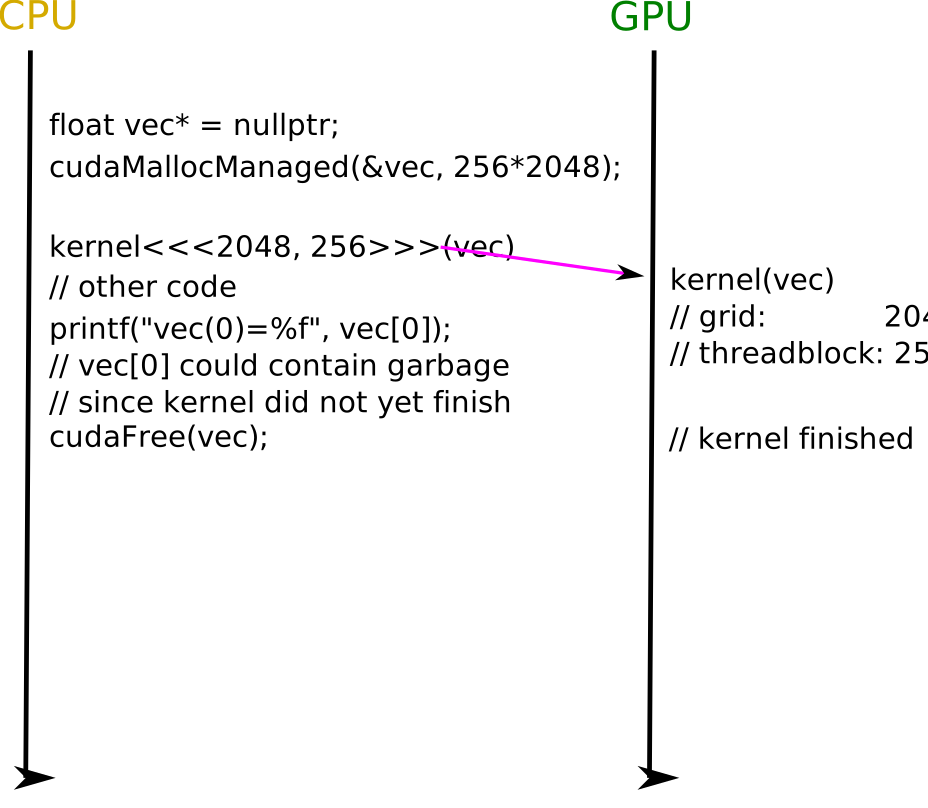
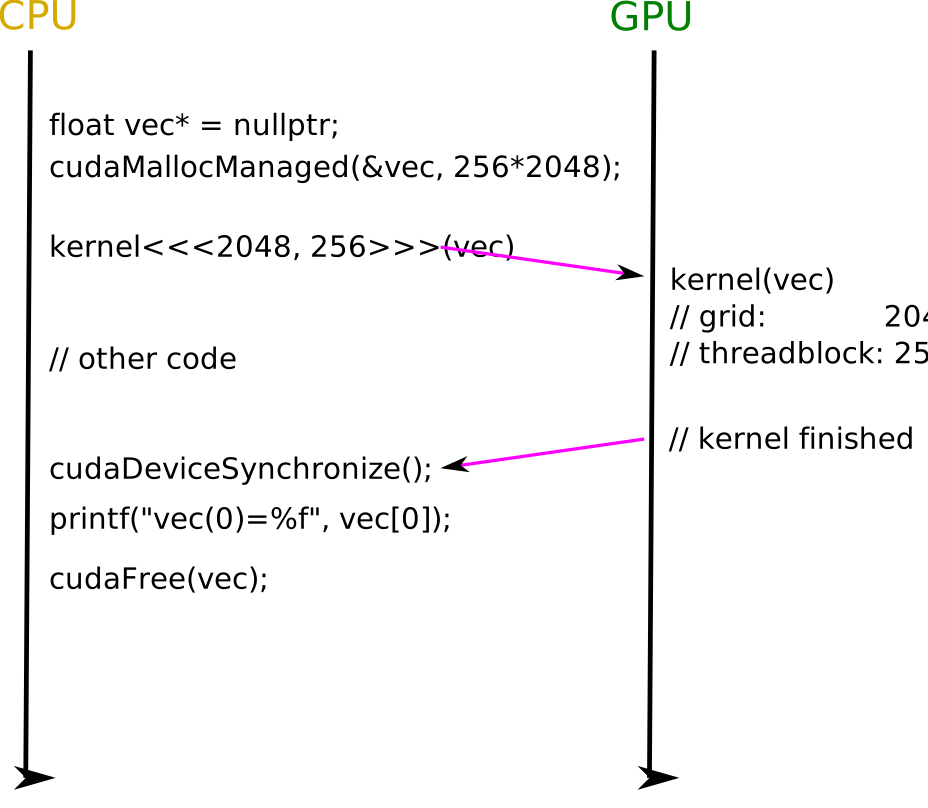
Key synchronisation primitives:
cudaDeviceSynchronize()— blocks the host until all preceding kernels and memory operations complete__syncthreads()(C) /call syncthreads()(Fortran) — barrier for all threads in a thread blockcudaMemcpy— synchronous by default (acts as an implicit barrier)__threadfence()— ensures all global/shared memory writes by the calling thread are visible to other threads
Exercise: Vector-scalar multiplication on GPU
Vector-Scalar Multiplication with Managed Memory
Given the following CPU code that computes c[i] = a[i] * b for a vector:
Tasks:
Modify the code to use
cudaMallocManaged(C) or themanagedattribute (Fortran) for the arrays.Write a kernel that performs the multiplication.
Start with
<<<1, 1>>>(single thread), then modify to use many threads and blocks.Add appropriate synchronisation.
Solution
The key changes are:
Replace
mallocwithcudaMallocManaged(or addmanagedattribute in Fortran)Mark the computation function with
__global__Add
cudaDeviceSynchronize()before reading results on the hostUse thread indices to parallelise:
int i = threadIdx.x + blockDim.x * blockIdx.x;
Parallel Vector-Scalar Multiplication
Modify your solution to use many threads in many blocks:
Use
threadIdx.x,blockDim.x,blockIdx.x, andgridDim.xto distribute work across threads.Advanced: Can you remove the loop from the kernel entirely by using enough blocks to cover the vector?
Solution
Without loop (one thread per element):
__global__ void eval(float* a, float b, float* c, int size) {
    int i = threadIdx.x + blockDim.x * blockIdx.x;
    if (i < size)
        c[i] = a[i] * b;
}
// Launch:
eval<<<(size + 255) / 256, 256>>>(a, b, c, size);
Keypoints
Managed memory (
cudaMallocManaged) is the simplest approach — data migrates automatically, but you must synchronise before host accessAlways synchronise (
cudaDeviceSynchronize) before accessing GPU-modified data on the host