Unified Memory
A GPU-accelerated system has two physically separate memory spaces: host memory, which host code can access, and device memory, which device code can access. This episode starts from that separation and introduces unified (managed) memory, the simplest way to make the same data available on both sides: the CUDA runtime migrates the data as needed, so no explicit copies are required. It also shows the four paradigms of unified memory that exist today and how to find out which one a given system supports.
The episode then turns to what remains the programmer’s responsibility. Kernel launches are asynchronous, so the host has to synchronise before it reads data that a kernel has modified, and the runtime cannot always predict access patterns, which is where prefetching comes in. A hands-on exercise ports a vector-scalar multiplication to managed memory, first with a single thread and then with many threads and blocks.
Questions
Host and device have separate memories — so what does it mean for them to share one pointer?
If the runtime migrates data automatically, when do you still have to synchronise by hand?
What do you know about your own access pattern that the runtime cannot work out for itself?
Objectives
Understand the difference between host memory, device memory, and unified/managed memory
Allocate unified memory and understand its synchronisation requirements
Understand synchronisation between host and device
Instructor note
45 min teaching
15 min exercises
Memory spaces
A GPU accelerated system has two main memory spaces that are physically separate in most cases:
Host (main) memory — CPU RAM, accessible by host code
Device (global) memory — GPU VRAM, accessible by device code
Without special annotations or allocation functions, memory resides in host memory and is not accessible from the device in general unless it is unified memory. To use data on the GPU, you must either:
Have a system in which all allocations are unified memory - then luckily nothing special to do,
Use explicitly managed/unified memory — the CUDA runtime handles transfers automatically if needed, or
Explicitly allocate device memory and copy data between host and device.
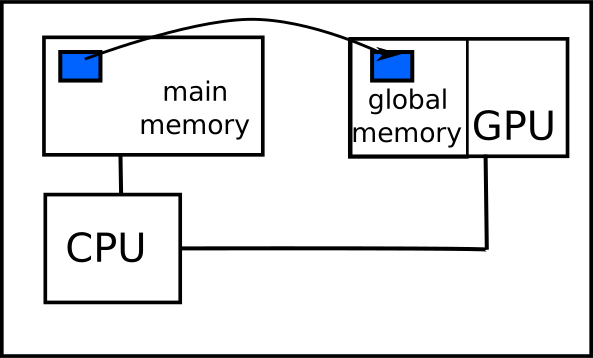
Unified memory (managed memory)
Paradigms of managed/unified memory
Unified memory means that both, CPU and GPU, can access that memory (somehow).
There are currenty four different ‘paradigms’ of managed/unified memory.
Limited unified memory support,
Full support for explicit managed memory allocations,
Full support for all allocations with software coherence,
Full support for all allocations with hardware coherence.
Today, most (data center) GPUs have at least full support (Linux, not Windows).
Newer GPUs (CC 8.0) and sufficiently new operating systems (Linux) have full support with software coherence.
Some systems, e.g. Grace Hopper, also have full support with hardware coherence.
Decide which paradigm is supported on a system
Several attributes exist and must be queried to decide which paradigm of unified memory is supported. The following tree can help to decide. Start at the top and query each of the listed properties, e.g. cudaDevAttrPageableMemoryAccessUsesHostPageTables. Then go through the tree and the leaves will tell which paradigm is supported.
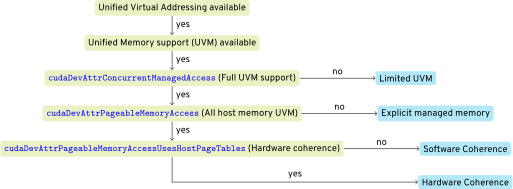 Example: If unified virtual addressing is available - today almost everywhere, then unified memory is supported. If then
 cudaDevAttrConcurrentManagedAccess has value 0 (meaning no), only the limited unified memory paradigm applies.
Explicit managed memory
Explicit managed memory is one of the simplest ways to share data between host and device. The CUDA runtime automatically migrates data as needed. Migration works at the granularity of memory pages — the fixed-size blocks (typically 4 KB to 2 MB) in which the operating system and the GPU manage memory — so touching one element moves the whole page. Only systems with software/hardware coherence are simpler to use since on such systems no special annotations or API calls are needed, i.e. no cudaMallocManaged, __managed__ (C/C++) or managed attribute (Fortran). Any method to allocate memory of C/C++ or Fortran will result in unified memory on such systems. But everything else of this section still applies. Thus, managed memory will be discussed in detail here.
Since CUDA 4, Unified Virtual Addressing (UVA) provides a single address space shared by CPU and all GPUs. Managed memory (available since CUDA 6) builds on UVA to provide automatic data migration.
Type-Along
__device__ __managed__ double X[1024];

__global__ void add_kernel(double* X, double* Y, int length) {
    int index = threadIdx.x + blockIdx.x * blockDim.x;
    if (index < length)
        X[index] += Y[index];
}

int main(void) {
    double *Y, *X;
    // allocate 1024 * sizeof(double) bytes of managed memory, return device pointer in first argument
    cudaMallocManaged((void**)&Y, 1024 * sizeof(double));
    cudaMallocManaged((void**)&X, 1024 * sizeof(double));
    add_kernel<<<4, 256>>>(X, Y, 1024);
    cudaDeviceSynchronize();  // Must synchronise before host access!
    cudaFree(Y);
    cudaFree(X);
}
module device_code
contains
  attributes(global) subroutine add_kernel(X, Y, length)
    real(8), managed :: X(length), Y(length)
    integer, value :: length
    integer :: idx
    idx = threadIdx%x + (blockIdx%x - 1) * blockDim%x
    if (idx <= length) X(idx) = X(idx) + Y(idx)
  end subroutine
end module

program main
  use device_code
  ! attribute 'managed' indicates allocation of managed memory
  real(8), managed :: X(1024)
  real(8), allocatable, managed :: Y(:)
  integer :: error
  allocate(Y(1024))
  call add_kernel<<<4, 256>>>(X, Y, 1024)
  error = cudaDeviceSynchronize()  ! Must synchronise!
end program
Advantages:
Data is moved automatically as needed — no need to manage transfers
“Oversubscription” is possible (managed allocation on host can exceed GPU memory)
Disadvantages:
The programmer must still synchronise before accessing data on the other side. See Asynchronous execution and synchronisation
Automatic transfers might not be optimal — the runtime cannot always predict access patterns
When is managed memory the wrong choice?
The runtime migrates pages for you, but it reacts to access patterns rather than anticipating them. Consider two workloads: a lookup table written once on the host and then read by every kernel for the rest of the run, and an array that host and device touch alternately inside a loop.
Which of the two would you expect the automatic migration to handle badly, and why? What would you measure before deciding to manage the transfers by hand instead?
Important rules
const-qualified variables and C++ references cannot be declared as managed memoryC++ classes/structs with
__managed__members have many restrictions; Fortran derived types withmanagedmembers work more freelyManaged memory can only be allocated and freed in host code
Prefetching data
Prefetching data is an opportunity to optimise performance: we can give the system hints where data is needed when. Then the system can optimise the data transfer.
Use
cudaMemPrefetchAsyncto give the CUDA runtime information, in which place you want the data to be.Prefetching is applicable to all unified memory allocations, no matter how they have been allocated.
Note
The interface changed with CUDA 13, see the two different code snippets for CUDA below 13.0 and CUDA 13.0 and higher. The new interface allows more detailed destinations (e.g. respecting NUMA host).
Prefetching data with CUDA until 13.0
const int vec_size = 10000000;
size_t vec_size_bytes = vec_size*sizeof(float);
float* vector = nullptr;
cudaMallocManaged((void **)& vector , vec_size_bytes);
int current_gpu = 0;
// other code touching vector on host
// prefetch vec_size_bytes byte of data of 'vector' to current_gpu
cudaMemPrefetchAsync(vector, vec_size_bytes, current_gpu);
// cuda kernel call
eval<<<(vec_size+255)/256,256>>>(vector,vec_size);
cudaDeviceSynchronize();
// prefetch data to CPU
cudaMemPrefetchAsync(vector, vec_size_bytes, cudaCpuDeviceId);
integer , parameter :: vec_size = 10000000
real , dimension (0: vec_size -1), managed :: vector
integer :: current_gpu = 0
! other code touching vector
! prefetch vec_size elements of data of 'vector' to current_gpu
error = cudaMemPrefetchAsync (vector , vec_size , current_gpu , 0)
! cuda kernel call !
call eval <<<( vec_size +255) /256,256>>>( vector ,vec_size)
error = cudaDeviceSynchronize ()
! prefetch data to CPU
error = cudaMemPrefetchAsync (vector , vec_size , cudaCpuDeviceId , 0)
Prefetching data with CUDA 13.0 and newer
const int vec_size = 10000000;
size_t vec_size_bytes = vec_size*sizeof(float);
float* vector = nullptr;
cudaMallocManaged((void **)& vector , vec_size_bytes);
int current_gpu = 0;
// other code touching vector on host
// prefetch vec_size_bytes byte of data of 'vector' to current_gpu
cudaMemLocation location = {.type = cudaMemLocationTypeDevice, .id = current_gpu };
cudaMemPrefetchAsync (vector , vec_size_bytes , location , 0);
// cuda kernel call
eval<<<(vec_size+255)/256,256>>>(vector,vec_size);
cudaDeviceSynchronize ();
// prefetch data to CPU
location = {.type = cudaMemLocationTypeHost };
cudaMemPrefetchAsync (vector , vec_size_bytes , location , 0);
integer , parameter :: vec_size = 10000000
real , dimension (0: vec_size -1), managed :: vector
type(cudaMemLocation ) :: location
integer :: current_gpu = 0
! other code touching vector
! prefetch vec_size elements of data of 'vector' to current_gpu
location = cudaMemLocation(type = cudaMemLocationTypeDevice , id = current_gpu)
error = cudaMemPrefetchAsync (vector , vec_size , location , 0, 0)
! cuda kernel call !
call eval <<<( vec_size +255) /256,256>>>( vector ,vec_size)
error = cudaDeviceSynchronize ()
! prefetch data to CPU
location = cudaMemLocation(type = cudaMemLocationTypeHost )
error = cudaMemPrefetchAsync (vector , vec_size , location , 0, 0)
Tip
Prefetching is a pure performance optimisation. It should not affect correctness in any way. Actual behaviour of the CUDA runtime and system depends on settings applied to the memory range (might create copies). So, test it if it actually improves performance for a concrete code on a concrete system.
Managed memory API
__managed__ type_t variable_name;
// e.g.
__managed__ double X[1024]; // does not work for variable size array!
__host__ cudaError_t cudaMallocManaged ( void ** devPtr , size_t size , unsigned int flags = cudaMemAttachGlobal )
// devPtr is the pointer variable to which the (owning) pointer of the allocation should be stored into.
// size in bytes
// usually no need to change the flags
__host__  __device__ cudaError_t cudaFree ( void* devPtr )

// Prior to CUDA 13.0
__host__ cudaError_t cudaMemPrefetchAsync ( const void* devPtr , size_t count , int dstDevice , cudaStream_t stream = 0 )
// CUDA 13.0 and after
__host__ cudaError_t cudaMemPrefetchAsync ( const void* devPtr , size_t count ,
cudaMemLocation location , unsigned int flags , cudaStream_t stream = 0 )
// flag must be zero for now
// count in bytes
type , [other specifiers], managed :: variable_name
! e.g. real (8), allocatable , managed :: Y(:)
integer function cudaMallocManaged (devptr , count , flags)
! devptr may be any allocatable , one -dimensional managed array of a supported type or TYPE(C_DEVPTR)
! flags should be cudaMemAttachGlobal or , in special cases , cudaMemAttachHost
! Prior to CUDA 13.0
integer function cudaMemPrefetchAsync (devptr , count , device , stream)
integer(kind=cuda_count_kind ) :: count ! number elements; if devptr of type TYPE(C_DEVPTR) bytes
integer (4) :: device
integer(kind=cuda_stream_kind ) :: stream
! CUDA 13.0 and after
integer function cudaMemPrefetchAsync (devptr , count , location , flags , stream)
integer function cudaMemAdvise(devptr , count , advice , location)
integer(kind=cuda_count_kind ) :: count ! number elements; if devptr of type TYPE(C_DEVPTR) bytes
type(cudaMemLocation ) :: location
integer (4) :: flags ! must be zero for now
integer(kind=cuda_stream_kind ) :: stream
Comments to the API calls:
Prefer simple attributes and
allocatein Fortran instead of the API calls. However, they return error codes.CUDA Streams are out of the scope of this module. Using 0 for the stream parameter is sufficient in this module.
In general defaults are fine, do not change them without good reason.
Asynchronous execution and synchronisation
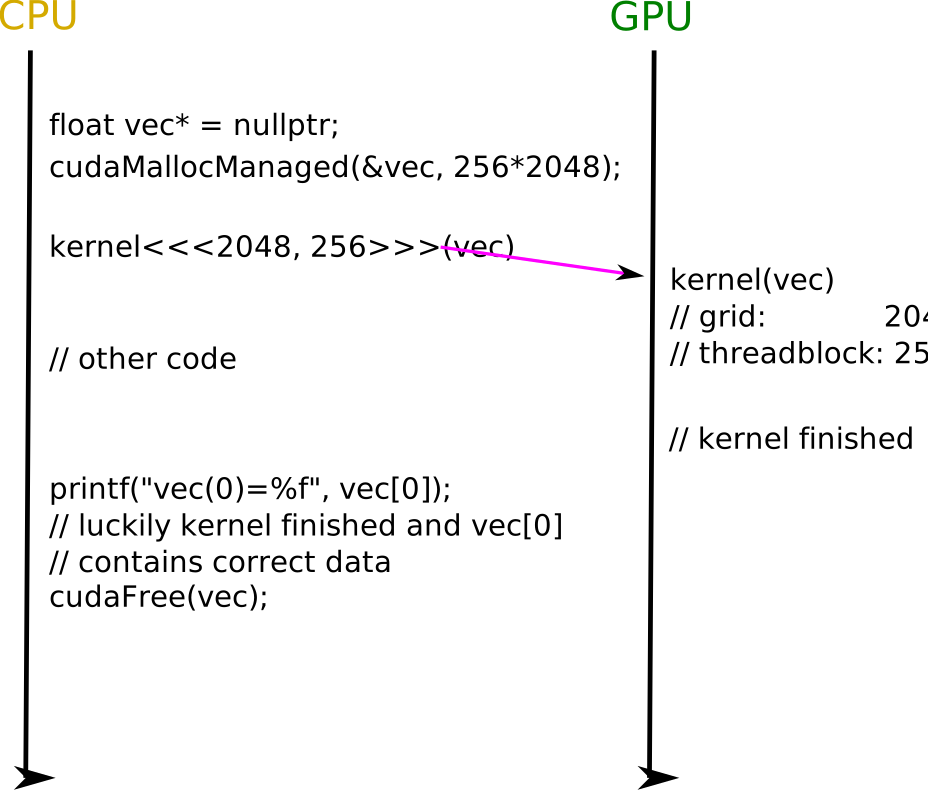
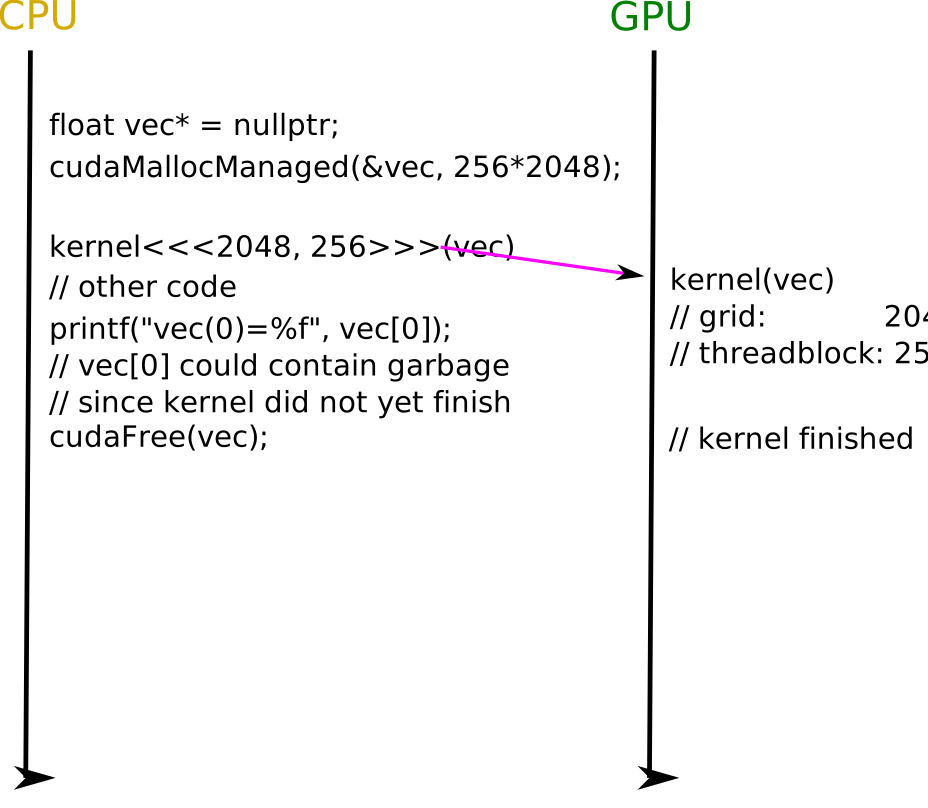
Since kernel launches are asynchronous, you must call cudaDeviceSynchronize() before accessing managed memory on the host after a kernel that modifies it.
Warning
Incorrect synchronisation between host and device is one of the most common sources of errors: without synchronisation, the host may read stale data — or, on systems without concurrent managed access (Windows, WSL, GPUs older than Pascal), the access may even cause a segmentation fault.
The three diagrams below show the same kernel/host interaction with twice incorrect and once correct synchronisation. Click the step buttons to advance.
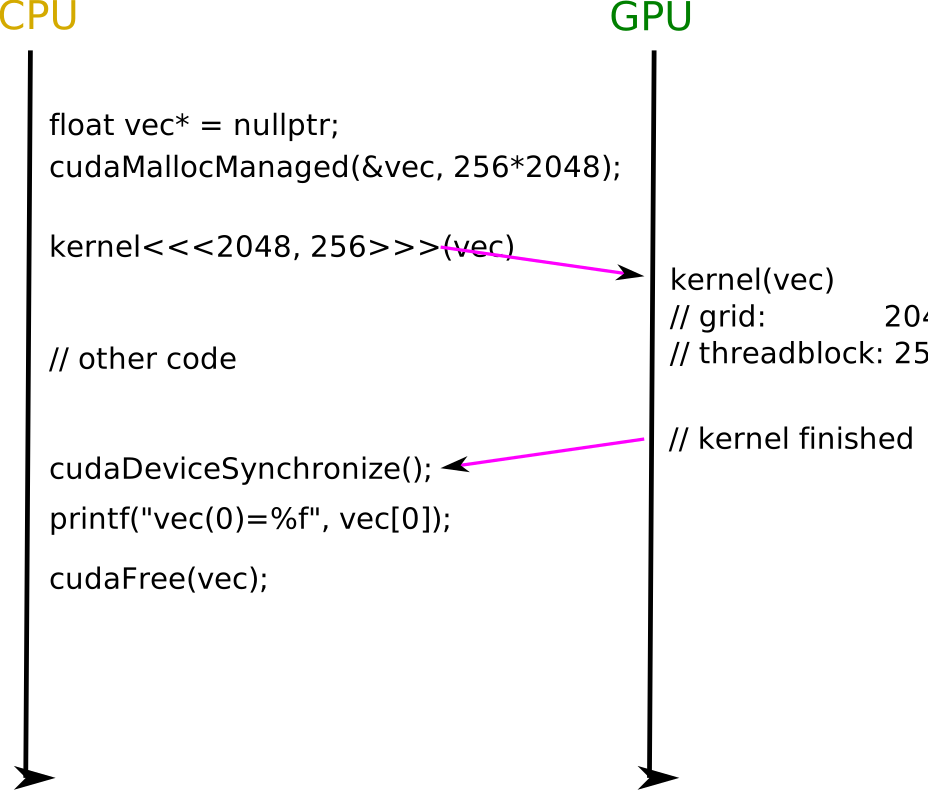
cudaDeviceSynchronize() makes the host wait until the kernel has completed. No data race anymore.Exercise: Vector-scalar multiplication on GPU
Vector-Scalar Multiplication with Managed Memory
Given the following CPU code that computes c[i] = a[i] * b for a vector:
const int size = 10000;
float* a = (float*)malloc(size*sizeof(float));
float* c = (float*)malloc(size*sizeof(float));
const float b = 2.0f;
for (int i = 0; i < size; i++) {
    c[i] = a[i] * b;
}
integer :: size
real, dimension(0:size-1) :: a, c
real :: b

  do i = 0, size - 1
    c(i) = a(i) * b
  end do
Tasks:
Modify the code to use
cudaMallocManaged(C) or themanagedattribute (Fortran) for the arrays.Write a kernel that performs the multiplication. Start with
<<<1, 1>>>(single thread)Add appropriate synchronisation.
Modify to use many threads and blocks.
Solution
The key changes are:
Replace
mallocwithcudaMallocManaged(or addmanagedattribute in Fortran)Place the loop in a function/subroutine and mark it as a GPU kernel
Add
cudaDeviceSynchronize()before reading results on the hostUse thread indices to parallelise:
int i = threadIdx.x + blockDim.x * blockIdx.x;
Parallel Vector-Scalar Multiplication
Modify your solution to use many threads in many blocks:
Use
threadIdx.x,blockDim.x,blockIdx.x, andgridDim.xto distribute work across threads.Advanced: Can you remove the loop from the kernel entirely by using enough blocks to cover the vector?
Solution
Without loop (one thread per element):
__global__ void eval(float* a, float b, float* c, int size) {
    int i = threadIdx.x + blockDim.x * blockIdx.x;
    if (i < size)
        c[i] = a[i] * b;
}
// Launch:
eval<<<(size + 255) / 256, 256>>>(a, b, c, size);
Keypoints
Managed memory (
cudaMallocManaged) or in general unified memory is the simplest approach to access data on host and device — data migrates automatically as needed.Always synchronise (
cudaDeviceSynchronize) before accessing GPU-modified data on the host and vice versa.
See also
Unified and system memory [1]
Unified memory [2]
Further reading for this episode: Episode 1: Unified memory